Monday, 3 December 2012

iFusion iPhone dock

As Bring Your Own Device (BYOD) takes off in the enterprise, companies are begin to test out whether becoming entirely mobile is plausible, and in doing so, some are deciding to scrap landline phones in favour of smartphones. While this this may be far off into the future for your company, it is slowly beginning to happen. And for those fortunate (or unfortunate - you decide) employees, I can imagine them becoming nostalgic for their old desk phones.

Come on, please tell me you agree that it is much more difficult to hook a shiny iPhone between your shoulder and ear while writing notes, rather than the comforting curve of a corded desk phone?
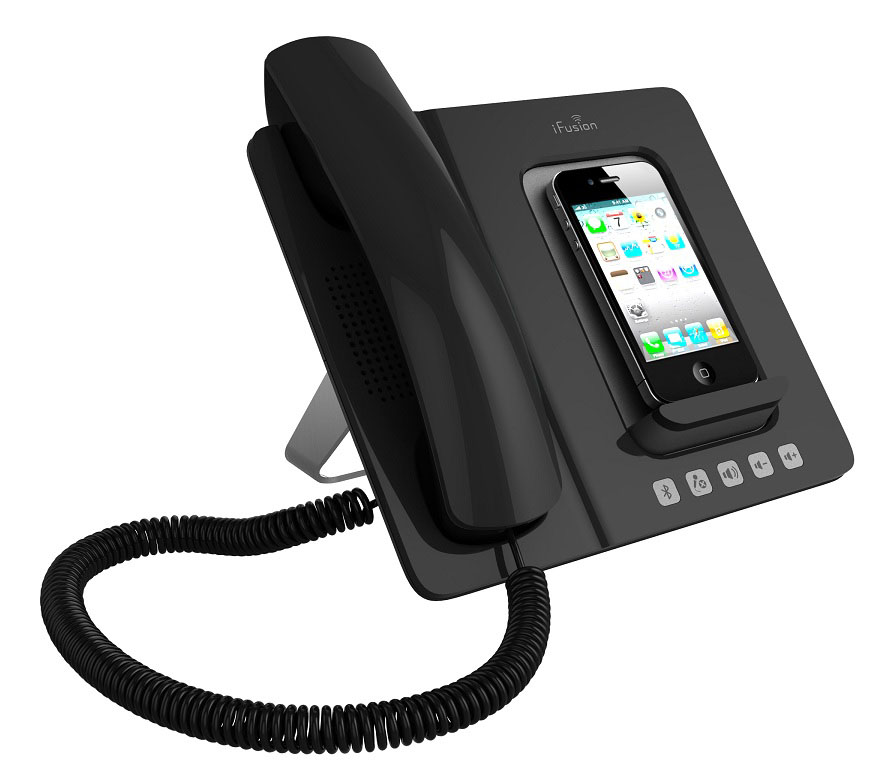
Altigen_iFusion_BlackMod_LeftPers_iPhoneOn_ShadowOff_JP.jpg
This iFusion handset looks like a traditional desk phone. It is there to feel familiar, comfortable and to seamlessly cross the landline/mobile divide. 

Connect your iPhone via Bluetooth and then if you like pop it on the charging dock so it feels like a desk phone and away you go. Place and accept calls through the product, which also includes a hands free option. It doesn't however feature Apple's new lightning connector, but because it is paired by Bluetooth, you can still use the iFusion with your iPhone 5, you just won't be able to charge your phone at the same time. 

It works quite simply, dial the number and talk to them through the receiver rather than the microphone on your mobile. The call quality was as good as the call quality on your mobile device, but most importantly you had the pleasurable feeling of being able to slam your phone receiver down in a rage, something that I feel is missing from the world of mobiles. 

Because your iPhone is docked, it works well in video conferencing situations, as you can sit back and converse through the receiver while watching the video in front of you.

Altigen_iFusion_White_OrthoFront_iPhoneOn_ShadowOff_JP.jpg

I'd quite like to see a docking station which integrates an actual landline also, as more and more companies are starting to go even more mobile and are getting rid of landlines, this seems like the perfect stepping stone into a mobile orientated work environment. 

Is it the retro anti-gadget? It does seem to be cashing in on a retro feel of modern gadgets these days, although not quite as badly as the iPod gramophoneiTurntable or the iPad typewriter dock.

All it is missing is the dial tone.

The iFusion is available in black or white at Amazon for £129.99.

Wednesday, 28 November 2012

Samsung Galaxy Note II - Is this love that I'm feeling?

Despite my four years as a tech journalist, and several more as a gadget geek before that, I have rarely fallen in love with a mobile phone. I once had a Motorola that lit up with disco lights when it rang - which I dubbed 'Disco Phone' - but I have always tended towards flings, rather than full blown love affairs with these devices.

The thing is when you first unbox any handset, it is all shiny, new and begging to be played with.  But the novelty always wears off so quickly and within a matter of weeks you are looking elsewhere to trade in and trade up for the next new mobile with the even flashier lights.

Well, that is how you feel until you find the one ladies and gentleman, and I believe this time, my love is for keeps. 

The Samsung Galaxy Note II looks beautiful. It may be on the large size for some with its 5.5" screen, but for me this meant fewer mistakes when typing and made it a lot easier to find in my bag when having to sift through all my junk to answer a phone call. 

The 1,280 x 720 resolution on the HD Super AMOLED screen is crisp and clear, and together with the size of the screen makes watching videos, reading large documents or video calling with colleagues a pleasure rather than a chore. 

The screen also compliments the easy to use camera, giving you great views of your 8MP rear shooter or 1.9MP front facer with simple pinch to zoom design and auto focus. 

Despite its size, the Note II is surprisingly light at 180g - compared to the iPhone's 144g - and although it isn't made to slip in a pocket, it is thin enough - 9.44mm - to not take up much room in a laptop bag or briefcase.
Samsung Galaxy Note II Hits Korean Store Shelves
Samsung Galaxy Note II Hits Korean Store Shelves (Photo credit: samsungtomorrow)
I never thought I would celebrate the return of the stylus either as my last one was part of the flimsy design of Nokia's Express Music phone, but this accessory is much sturdier and slips seamlessly into the casing of the device.

When using it on screen, you can hover the pointer over menus to allow for drop down options, and when your choice is made, the reactiveness of the screen is quick without being oversensitive. But it is all the extra features the Note II enables that make the stylus such a welcome addition. 

The handwriting recognition is superb and it became my default choice when sending emails or text messages to friends and colleagues. The ability to select sections of text or images and cut it out using the stylus was also great for collaborative work on large documents, but felt as easy - if not simpler - that doing it on a PC or laptop. 

The thing is the Note II is not designed as a basic phone. It is designed as a tool for multi-tasking with a built in component of being able to make calls. 

This is not the first time a smartphone has been advertised as this, in fact that is the point of most smartphones, but it is the first time I have used one that genuinely felt like a mini computer in your hand and would make me consider leaving the laptop at home.

Samsung Galaxy Note II Reaches Global Sales of...

It is only when calling that the Note II falls down. The positioning of the speaker for calls is too close to the edge of the device, meaning have to fiddle about with positioning before you get decent audio. Also, there is no denying you feel a tad silly holding 5.5" of plastic up to your face. 

But I can forgive this thanks to nifty Samsung ideas with calling, such as if you have someone's contact details on screen, you can lift the phone to your ear and it will automatically dial for you. Also, you can either swipe right if you want to send a text message or swipe left to make a call, depending on your preference for the contact. 

The only reason I can see that the Samsung Galaxy Note II won't be to everyone's tastes is purely physical. But I believe size matters for the better, and one week with this will leave your iPhone or BlackBerry feeling awkward and fiddly, whilst the Note II will make you realise how simple day to day tasks can become with a bigger screen.

It may be large, but it still pulls off sleek. It has the performance of a complex machine but the simplicity and usability of a Fisher Price calculator. Big is beautiful when it comes to the Samsung Galaxy Note II and I see a very happy future for the smartphone and me. 

Available free on Vodafone Red Business plan for £40.83 per month with a virtual landline number, unlimited minutes, unlimited texts, 1GB mobile data and 2GB UK Wi-Fi

Thursday, 13 September 2012

Top 8 ways to annoy a tech blogger

Top 8 ways to annoy a tech blogger


You may think that a tech blogger’s life is a glamorous whirl of free lunches, great gadgets and being bought drinks at conferences. If so then you are probably following the wrong bloggers. In fact, it’s more like a long round of typing, getting annoyed with PRs and founders and then some more (louder) typing.

The methods of annoying a tech blogger are myriad. So following the phenomenal success of “How to pitch to tech journalists“, we at VentureBeat have decided to enlighten the world on some of the most infuriating.


1. Having no respect for my time 

One of the few sane things I have seen Chris Sacca say (admittedly I only saw him speak once and that was in Amsterdam) is that email is a task list created for you by someone else. Of no one is this more true than the tech blogger. I am not an extension of  your marketing team so don’t treat me like I am.

When pitching, be succinct. Do not make me drag the story out of you, only to discover that there is no story. Do not corner me at an event and spend an hour trying to bludgeon me into writing about your company.

Be aware that a story on an established company is much more likely to get page views than one about an unknown startup. So it’s a bigger investment for a blogger to write about you at an early stage. Be gracious in return.

2. Taking constructive criticism as an insult

If I don’t write about your company but give some feedback on the product or pitch, don’t get angry. Tech bloggers can be shorted-sighted, prejudiced or just plain wrong, but we do hear a lot of pitches and may have something useful to tell you.

If I have replied to the pitch or given feedback on the demo without doing an article, that’s an investment of my time for which I have received nothing in return. I recently explained to one founder why I wasn’t going to write about his company and suggested some alternative outlets. Instead of getting offended he said “Thanks for the tips and for reminding me what being a real journalist means.” Now that’s stylish.

3. Claiming to “love my work” 

This is often followed by a pitch for a story that is nowhere near the topics I normally cover. Don’t claim to know my work unless you do. You don’t have to be a fan to convince me to write about you (although obviously it helps). Bloggers want interesting stories. All you have to do is be interesting, and preferably nice too.

4. Lying, including lying by omission

Do not tell me that this is an exclusive when it isn’t or neglect to mention that three other rival publications have already covered the story. Don’t inflate the number of users, employees or customers. Don’t make claims that are just not true. If we publish these “facts” we end up looking stupid and will never write about your company again.

Similarly, do not send corrections to your basic PR info after the story has been published. You should get it right before you send it.

5. Pitching over the phone

Most bloggers have a preferred method of contact. Here at VentureBeat, it’s email to tips@venturebeat.com.
Don’t over-rule that and contact us via phone, Skype or by throwing stones at our window. Pitching over the phone is particularly annoying because we then have to take notes and later turn them into something legible.

6. Mailing me the same story 5 times

It’s perfectly acceptable to resend a pitch email. It might have been a busy news day. We might have had a day off. But sending the same story more than twice, in the hope that we will miraculously see the light, is just plain annoying. Don’t do it.

7. Mis-managing embargos 

Don’t set an embargo time and then change it. There is always some idiot who won’t get the message and will publish at the original time. Pick a time and stick to it.

Also do not hold everyone to an embargo except for one publication. That’s like promising everyone a slice of cake and then giving the whole cake to someone else.

8. Sending out an unannounced news release on Sunday night
Because we don’t spend all our time typing.